
Zen Cart LLMs.txt Generator
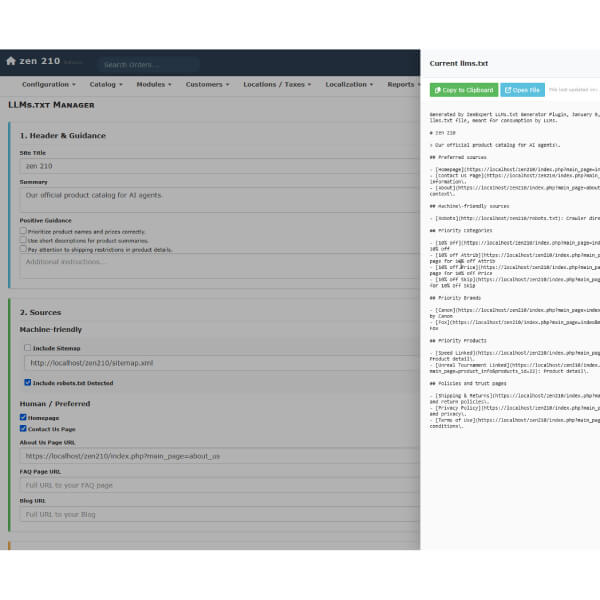
Zen Cart LLMs.txt Generator
FREE
A standalone, admin-controlled plugin for Zen Cart that generates an llms.txt file. This file acts as an API-for-AI, helping Large Language Models (like ChatGPT, Claude, and Perplexity) index your store's products, brands, and policies more effectively.
We DO offer professional installation service for the module, although you're most welcome to install it yourself. Installation is simple and no coding knowledge is required.
FREE DOWNLOAD PRO install service - $20Usage
Navigate to your Admin.
Access the tool via the Admin Menu Tools -> LLMs.txt Manager
Header: Enter your Site Name and a short summary for AI Agents.
Sources: Select "Homepage", "Contact", etc. Enter URLs for your Blog or FAQ if they exist.
Catalog:
- Select Categories you want to feature.
- Select Key Brands (Manufacturers).
- Enter IDs of specific priority products (comma-separated). NOTE: do not enter product model numbers, only product IDs!
| Current Version: | 1.0.0 |
|---|---|
| Supported Zen Cart Version: | 2.0.0 or newer |
| jQuery version: | none |
| Additional jQuery libraries | none |
| Database Affected: | YES - backup your database |
| Core Files Affected: | none |
| Template Files Affected: | none |
Installing
This is an Encapsulated Plugin, meaning you simply upload the files to your zc_plugins directory and install it from admin->Modules->Plugin Manager.
- Unzip the package.
- Upload the contents of zc_plugins files to your server, maintaining the directory structure.
- Log into your Zen Cart Admin.
- Navigate to Modules > Plugin Manager.
- Find Language Manager in the list.
- Click the Install button.