
Social Login for Zen Cart (Google Login, Facebook Login, Apple Login)
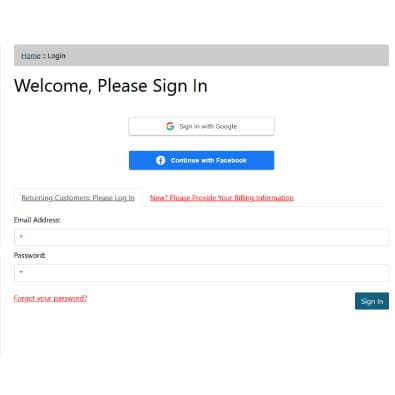
Zen Cart Social Login
FREE
The Social Login plugin provides a seamless, multi-provider OAuth 2.0 authentication system for Zen Cart. Built on the industry-standard PHP League OAuth client, this encapsulated extension allows customers to register and log in using their existing Google, Facebook, or Apple identities without leaving your storefront.
We DO offer professional installation service for the module, although you're most welcome to install it yourself. Installation is simple and no coding knowledge is required.
FREE DOWNLOAD PRO install service - $20Overview
The Social Login plugin provides a seamless, multi-provider OAuth 2.0 authentication system for Zen Cart. Built on the industry-standard PHP League OAuth client, this encapsulated extension allows customers to register and log in using their existing Google, Facebook, or Apple identities without leaving your storefront.
Core Architecture & Features
- Unified Callback Routing: Employs a single dynamic endpoint for all OAuth providers, drastically simplifying integration and allowing for rapid expansion to future providers.
- WAF & ModSecurity Bypass: Utilizes
form_postresponse modes combined with local session recovery bounces to prevent firewall 406 errors (Remote File Inclusion false-positives) without requiring server-level rule whitelisting. - Cart & Session Preservation: Actively intercepts cross-origin cookie drops triggered by modern
SameSite=Laxbrowser policies. Carts built prior to logging in are safely retained and merged into the authenticated session. - Automated Account Provisioning: Safely parses missing provider data (e.g., Apple's proxy emails or Facebook's phone-only accounts) and seamlessly links external social identities to existing Zen Cart customer database records.
| Current Version: | 1.0.0 |
|---|---|
| Supported Zen Cart Version: | 2.0.0 or newer |
| jQuery version: | none |
| Additional jQuery libraries | none |
| Database Affected: | YES - backup your database |
| Core Files Affected: | none |
| Template Files Affected: | none |
Installing
This is an Encapsulated Plugin, meaning you simply upload the files to your zc_plugins directory and install it from admin->Modules->Plugin Manager.
- Unzip the package.
- Upload the contents of zc_plugins files to your server, maintaining the directory structure.
- Log into your Zen Cart Admin.
- Navigate to Modules > Plugin Manager.
- Find Social Login in the list.
- Click the Install button.
Detailed guides on how to get your free API keys for each social platform are included with the plugin files.